Principia 2026.07.09

Posted on 9 July 2026 by ROllerozxa
Hello, Principia 2026.07.09 has been released. The time passed since the last release is quite short but there is still a significant amount of changes that have been made since the previous release.
As usual, you can find downloads on the Download page, and the full list of changes in the Changelog. F-Droid and various Linux distribution packages should receive the update within due time.
Donations
This summer marks 4 years since the Principia source code was released. I, ROllerozxa, have played a major role throughout most of the open source project's life, and in the recent years I've been the sole person working on the game with the exception of small contributions from others.
If you appreciate the work I've done to keep Principia alive and improving for all these years, please consider donating if you can.

Better touch support on non-Android platforms
The experience of playing the game with a touchscreen on non-Android platforms, such as mobile Linux or Windows devices with a touchscreen, has been greatly improved. All functionality that was previously hardcoded to only exist on Android are now controlled by the "Enable touch controls" in the settings, meaning that the experience should be right on par with the Android version when it is enabled.
During the development, I recorded this video showcasing the game running on my corebooted Chromebook. It has a touchscreen, can be folded back to act as a tablet, and was the primary testing device for the work.
If you have a touch-enabled Windows device then multitouch should also work again there now, in addition to all the other touch improvements that extends to Windows.
In a similar vein, you can now switch the game to use OpenGL ES on Linux without needing to rebuild the game. Simply go into settings.ini and set use_gles to 1. This would be useful for mobile devices where regular OpenGL is not available, as was covered 2 years ago when trying to run Principia on postmarketOS for the first time. Wow!
Migrating to SDL3
Principia is now using SDL3 on all platforms instead of SDL2. This is mostly a technical maintenance change but should result in some improvements across platforms. But most importantly it has unblocked work on future features such as gamepad support.
New with SDL3 is a revamped way of handling high density displays. Previously only the Android version would automatically adjust to the density of the display, but now this is also the case on desktop platforms. If you have already adjusted your UI scale, this may make things look massive, but just go into the settings and lower it to your liking.
If you are building Principia from source on a Linux distribution where SDL does not exist you may be interested in the -DUSE_VENDORED_SDL3=ON compile option, which will download and build SDL3 alongside Principia. See the compilation page on the wiki for more information.
For packagers, you would want to replace sdl2 with sdl3, or your distribution's equivalent. Also note that we no longer use SDL_ttf or SDL_gfx, and we vendor our own minimal versions of SDL_image and SDL_mixer. While the rest of the game is on SDL3 now, we currently still make use of the unsupported sdl2-api-on-sdl3 branch of SDL_mixer which provides the SDL2_mixer API on top of SDL3. In general it's best not to worry about this and just use the libraries that we vendor - the system version of SDL3 will be used by default without you needing to do anything.
Dear Imgui-based dialogs
The work to migrate Principia off of the current GTK-based dialogs on desktop goes back years at this point, with initial efforts being made by VOXEL to integrate Dear Imgui into Principia and beginning to reimplement dialogs.
GTK is a rich cross-platform UI toolkit for making detailed graphical user interfaces, and you may be familiar with it in programs such as GIMP and Inkscape. However GTK is quite large and consists of a lot of components, and its cross-platform nature generally ends at the traditional desktop platforms.
Principia is a video game. We want to support more platforms such as Android, the Web, maybe even consoles, and we do not want separate windows to be appearing in front of the main windows, especially when running in fullscreen. Originally Principia used the older GTK2, but during the open source project's lifespan we had to upgrade to GTK3 due to GTK2 being obsolete and disappearing from distributions. This caused some minor issues, but it also showed that GTK really is not a good fit for Principia as a lot of what we rely on has been completely removed in GTK4. So the only path forward is to move away from GTK entirely, which brings us to Dear Imgui.
Dear Imgui is a self-proclaimed bloat-free GUI library that is very minimal and easy to integrate into a typical rendering pipeline used in games. The windows are drawn directly in the main game window, and being designed for use in games, it also supports gamepad input out of the box. While it's intended more for debugging tools and in-game editors (if you do game modding you've probably run into it!), it is still a very mature and capable library that we thought would fit our needs well.
The goal previously has been to recreate all the dialogs such that they are on parity with the old ones, but with how many dialogs are used in the game, this has proved to be a large and daunting task. The new plan going forward is to make the transition more gradual, and with this release a couple dialogs have made the transition, while the rest still remain on GTK.

For this release, the following four dialogs are implemented using Dear Imgui now:
- Sandbox (hamburger) menu popup
- Sandbox mode selection menu
- Quickadd menu
- Game (hamburger) menu popup
For Linux users running Wayland, the old popup menus using GTK3 have proven to be very unreliable and may not even show up if you press the menu button. They were therefore chosen as the first ones to replace to improve the situation there.
If there are any missing functionality or behavioural issues with the new dialogs then now is the time to report them. Yes, they also look and feel different, but you will have to get used to it. We will not be going back.
Windows packaging improvements
Improvements have been made to the packaging of the Windows version of Principia. The installer has been completely revamped, instead of the old installer wizard chore it is a lot more straightforward and gets you to the game quicker.

In addition to this, the old play_community_level.bat script that was bundled with the portable Windows release of Principia is gone. In its place, there is a new "register-protocol-handler.exe" program which can register a Principia protocol handler for the current user. This will cause changes to the system, but does not require administrator privileges.
If you need to play Principia more discreetly, you may want to try the web version instead.
Principia on Windows XP
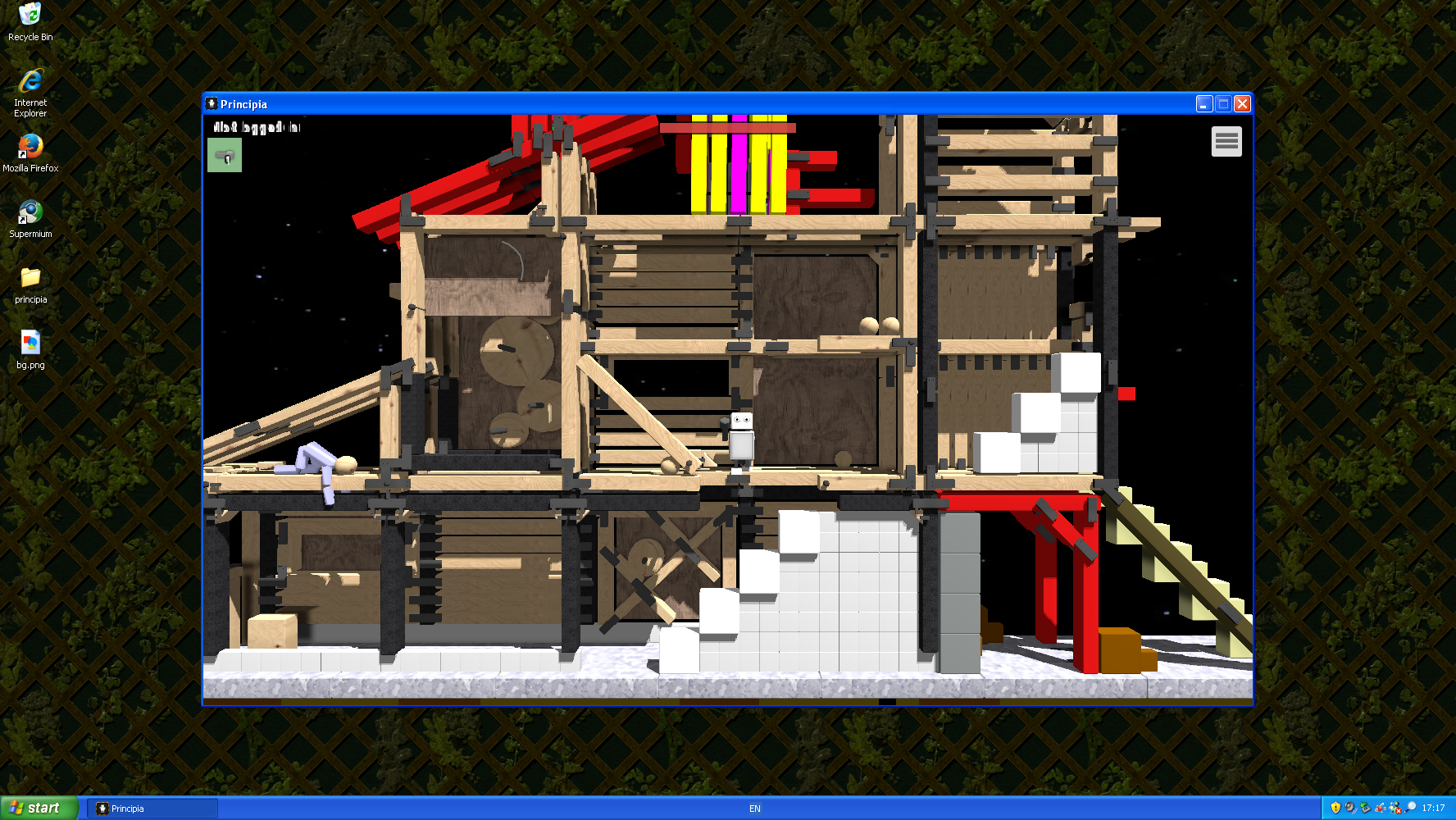
This is not directly related to the release, but last month I managed to get Principia running on Windows XP again. The Windows XP builds can be found here, but note that these builds are not officially maintained and do not follow the same release cadence as the official builds.
Cover image: ROllerozxa's Blåhaj plush playing a Principia procedural level on a laptop.